









Over 3 million people already trust empower® to create professional Office documents.
Challenge
Sound familiar?
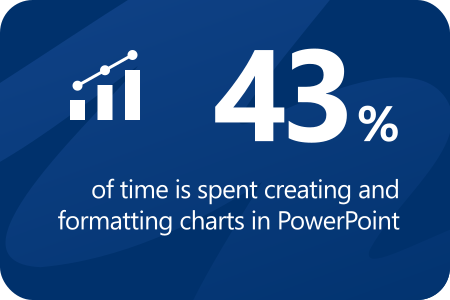
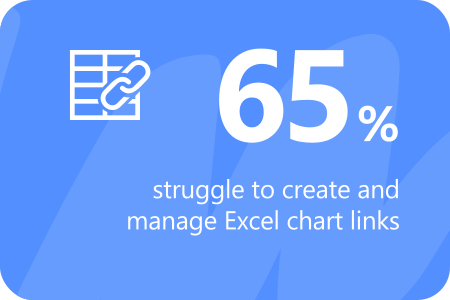
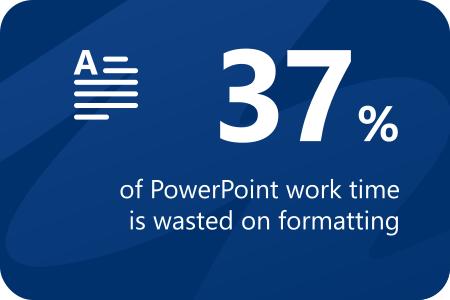
The following average data on current inefficiencies in Microsoft 365 usage is based on the world’s largest representative study of how businesses use Microsoft Office.
empower® Slide Generation & Chart Creation –
das Dream-Team für PowerPoint
empower® Slide Generation creates PowerPoint presentations using empower® AI, automation, and built-in templates - so you can produce professional, on-brand slides in minutes that are structured, consistent, and to the point.
Your benefits
The All-in-one solution for PowerPoint
Intuitive interface for quick navigation
empower® AI: Slides that automatically create themselves
Automated presentation creation
Central library for content and templates
Design and Consistency Check
Comprehensive set of layout tools
Automated agenda creation
Over 40 chart types for professional business reports in any scenario
One-click conversion of charts from other add-ins
Professional Excel link manager
Reliable Excel links
Excel linking for tables and text boxes
Highlights
empower® AI: Slides that practically create themselves
Seamlessly integrated into PowerPoint, empower® AI automatically creates professional, on-brand business slides in seconds instead of hours. Designed to make everyday work easier.
Learn more
Modern chart design. Better decisions.
Modern charts combine elegant design with clarity and precision, making complex data instantly easy to understand and analyze - so you can make faster, more informed decisions.
All the chart types you need
empower® delivers a wide range of chart types for professional reports. Additional elements like arrows, lines, breaks, and flexible number formatting ensure clear, consistent, and polished visualizations.
Excel links integration and data management
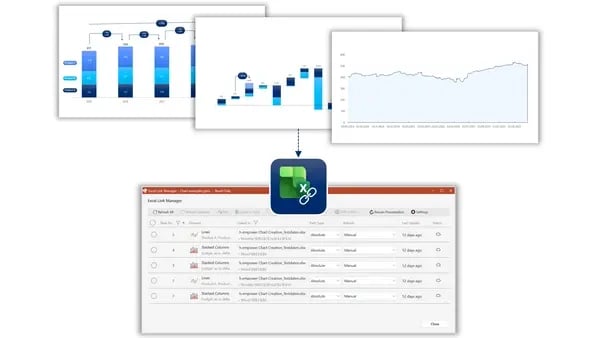
Link charts directly to Excel files - whether stored locally, on a network, or in SharePoint or Teams - and manage everything in a centralized Excel link manager. Relative path logic keeps your links intact, even when PowerPoint and Excel files are moved.
The best alternative to the Microsoft SharePoint slide library
SharePoint is often used for slide management in companies. However, with SharePoint 2013, Microsoft abolished the slide library component because of poor customer adoption. SharePoint’s slide library integrated clumsily with the slide library in PowerPoint, its search was insufficient search, and it was unstable. The slide library of empower® solves all those problems. It completely replaces your SharePoint slide library and offers further advantages for you.
Efficient slide library without SharePoint
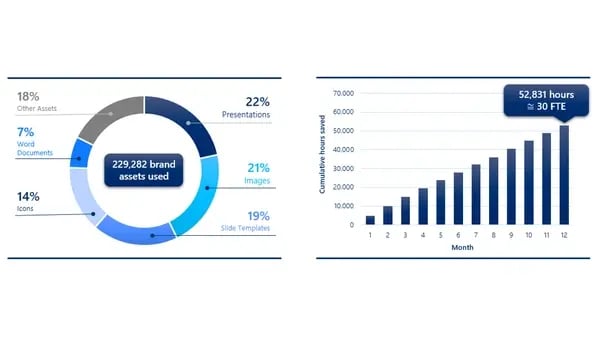
Make all your PowerPoint content available to the entire company in the empower® slide library. Share existing content and strengthen collaboration across the organization. Enhance your brand communication by embedding your design guidelines directly into PowerPoint. Deliver all your brand assets directly in PowerPoint. At the same time, you and your colleagues can work more productively and save time for the really important tasks.
About us
Your benefits with empower
All-in-One
instead of add-in overload
Say goodbye to standalone tools, integration issues, and update overload. Reduce costs and complexity with one integrated suite instead of multiple disconnected solutions.
Independent. Reliable.
Built in Germany.
Development, service, and support - all from Germany. empower is owner-managed, self-funded, and committed to long-term customer relationships. That’s why our product roadmap is shaped by customer feedback.
Fully supported -
with software and service
With empower®, you get more than powerful software - you get a complete support experience. We take care of your system maintenance, giving you one point of contact, full accountability, and minimal effort on your end.
FAQ
We have compiled these questions and answers to give you all the information you need about empower® PowerPoint, without requiring you to contact our sales team directly.
empower® Slide Generation is a PowerPoint add-in in the empower® Suite for the automated creation of professional presentations. empower® AI, automation, templates, and content management work seamlessly together, making it easy to create every slide efficiently, consistently, and with full brand alignment. Presentations are built in minutes, formatted to brand standards, and populated with up-to-date content.
empower® is built for organizations that want to create professional, on-brand documents in Microsoft Office more efficiently. It supports power users who regularly create presentations and reports, as well as brand managers and communications teams that need to manage and roll out corporate design centrally and consistently. At the same time, empower® gives IT and digital workplace leaders a centrally managed solution integrated with Microsoft 365 that supports governance, scalability, and clear processes, from midsize businesses to global enterprises.
Ideal for:
- Presentations for executives, clients, or sales teams
- Recurring chart-based reports
- Global teams with strict brand requirements
- Organizations with centralized content or brand management
- Use cases where time savings and consistency are critical
With traditional PowerPoint, you often start from scratch, manually handling design, formatting, and chart creation.
empower® offers:
- Centralized libraries and templates
- Automatic brand and formatting checks
- Automated chart creation
- AI-powered slide generation
- Quick search and content management directly within the application
empower® is highly scalable, from a single team to a global organization with tens of thousands of employees. The suite supports complex IT environments with centralized template and content management, as well as organizations that want to bring more structure and professionalism to their Microsoft 365 workflows. Templates, content, and brand standards can be managed centrally and used across the organization easily, consistently, and efficiently.
Charts in empower® can be linked directly to Excel data stored locally, on a network, or in SharePoint or Teams. Those data connections remain active, and chart data can be refreshed automatically whenever needed.
Yes. When you link an empower® chart to external Excel data, the connection remains intact and can be updated whenever the source data changes.
empower® integrates seamlessly with Microsoft 365, including PowerPoint, Word, Excel, and Outlook. Deployment is handled through centralized software distribution and, with proper preparation, can often be completed within a few days to a few weeks, depending on project scope and IT policies.
Yes. empower® is an enterprise-class software solution hosted in Microsoft Azure, integrated with Active Directory, and aligned with ISO 27001 standards, meeting the IT and security requirements of large organizations.