


AI can now create PowerPoint slides within seconds. However, a generated slide is not automatically a compelling slide. What matters is whether the message is clear, whether it fits the audience, and whether the presenter can confidently communicate the key points. This is where the difference between automated generation and persuasive design becomes clear: AI can build slides, suggest layouts, and structure content. But it does not know which message will truly resonate in a pitch, which number will be challenged by the executive team, or which objection a customer may raise next.
The questions that have not changed
The use case AI in PowerPoint is relatively new. The principles of effective presentations are not. Anyone who wants to persuade an audience in a pitch, executive meeting, or customer presentation still needs to ask the same questions:
- What is this slide actually trying to say?
- Why is this message relevant to the audience?
- Which specific information supports the conclusion?
- Is this slide thoughtfully designed, or was it simply completed quickly?
At empower, we have focused on these questions for more than 15 years, long before AI became part of the PowerPoint conversation. Today, we are among the biggest supporters of AI because it removes significant amounts of work for us and our customers, especially when creating presentations. At the same time, our experience clearly shows one thing: AI has changed the speed of creating presentations. It has not changed the responsibility for the message, impact, or decisions that presentations support.
What AI does well in presentations
AI is especially effective at tasks that require time but do not necessarily require strategic judgment. Examples include:
- Turning bullet points into an initial slide structure
- Creating layout suggestions
- Shortening or refining text blocks
- Cleaning up slide designs
- Preparing variations for different presentation formats
For many everyday situations, this creates significant efficiency. A status update, internal briefing, or first draft does not need to be built manually from the beginning every time. Enter a prompt, receive slides: for certain purposes, this is completely sufficient.
The challenge begins when a professionally generated slide needs to become a persuasive one. Persuasion does not come from a clean layout alone. It comes from compelling design, a clear message, appropriate storytelling, and an understanding of what the audience needs to take away.
Why an AI-generated slide does not automatically convince
AI can generate patterns. It can recognize how typical presentations are structured, which layouts may work, and how information can be organized visually. This is valuable. However, it is not the same as human judgment.
Whether a slide is convincing depends on questions that cannot be answered through formatting alone:
- What message should remain with the audience?
- Which information is truly relevant for decision-making?
- Which details create distraction rather than clarity?
- What objections will the audience have?
- Which message must the presenter personally be able to support?
For example, AI can create a polished revenue slide from three bullet points. But it does not automatically know whether a decline in the most important customer segment receives enough attention, whether the recommended action is clear enough, or whether a specific number could be politically sensitive within an executive meeting.
That is why generating is not the same as persuading. One is a technical process. The other happens in the minds of the people listening.
It is tempting to delegate as much as possible to AI. This saves time initially. The risk appears later, when someone asks questions and you no longer fully understand why a slide was designed the way it was.
The decisions made while creating a slide are not an unnecessary intermediate step. They are the moment when you take ownership of the content. Anyone who completely delegates this process may gain speed but lose confidence and authority. Because on stage, in a meeting, or in a customer conversation, the AI is not presenting. You are.
Nobody applauds a prompt.
What power users in companies should pay special attention to
Power users are not simply people who create many slides. They are the people whose presentations help drive decisions: in sales, management, consulting, marketing, transformation teams, and strategic projects.
Their slides influence whether a customer signs a contract, whether executives approve a budget, or whether a team follows a new direction. The role of power users was important before anyone discussed AI in PowerPoint. It remains important today.
For these PowerPoint professionals, AI is therefore not only a question of speed. It is a question of working methods.
The key question is not: How much can AI do for me? The key question is: Where can AI support me without taking away my control over the content?
What AI should handle and what humans must decide
Effective use of AI in PowerPoint requires a clear separation between execution and judgment.
AI should primarily support tasks that are repetitive, time-consuming, or primarily formal. Humans should make decisions where message, context, relevance, and impact matter.
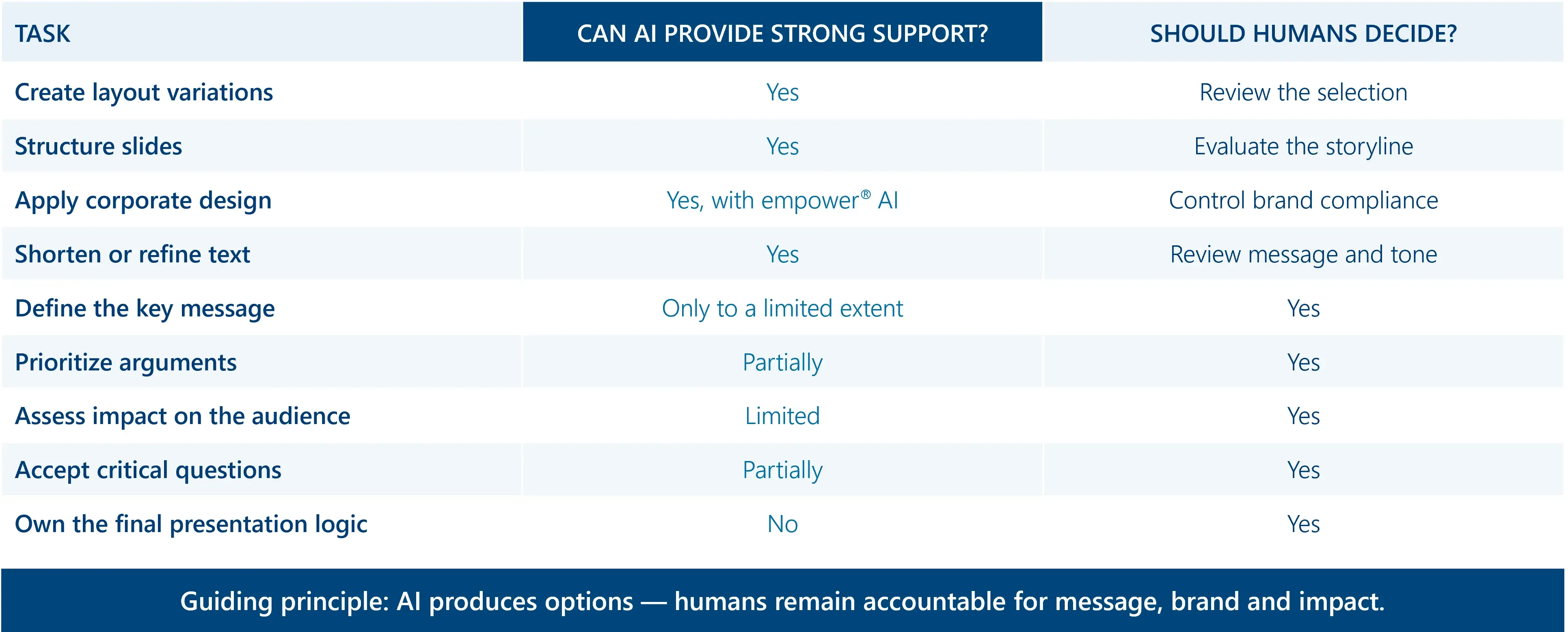
This distinction matters because strong AI support does not replace engagement with the content. It creates more room for it.
Effective AI support works with you, not instead of you
If you create presentations yourself, this does not mean avoiding AI. Quite the opposite. It means using AI where it genuinely removes effort: formatting, arranging, structuring, and visually implementing ideas.
The judgment remains yours.
If you are responsible for ensuring that power users in your organization have the right tools, the same principle applies. A tool that promises to do “everything automatically” sounds attractive at first. However, it may also remove the exact moment when people engage with the content they will later need to present and defend themselves.
Effective AI support for presentations should not aim to remove people from the process. It should reduce repetitive work while keeping people involved where judgment is required.
This is exactly the approach behind empower® AI. The goal is not to ask how much responsibility can be handed over to AI. The goal is to understand how people can use AI to create better presentations in less time.
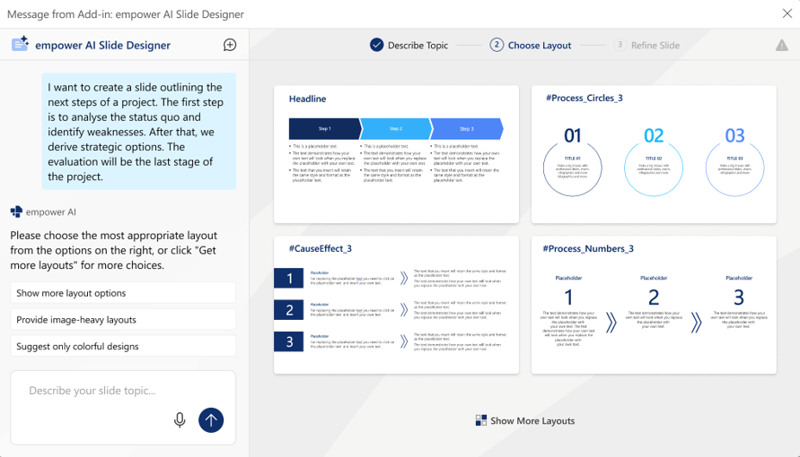
In practice, this means you first define what the slide needs to communicate. The AI then suggests suitable templates from your own corporate design library. You choose which template fits the situation, whether it is an investor pitch, customer presentation, or status report. The AI then creates the slide, including layout and formatting. If no suitable template exists for the situation, the AI can alternatively generate the slide from scratch. In both cases, the result remains 100% brand-compliant and ready to use immediately. This process saves, on average, half the time required for traditional slide creation.
This way, AI does not work for you. It works with you.
Conclusion: The best AI presentation is not created without humans
AI is changing how quickly presentations can be created. But it is not changing why presentations succeed.
A strong presentation still requires a clear message, relevant structure, audience understanding, and a person who can communicate the message effectively. AI can significantly accelerate this process. It can make slides cleaner, more consistent, and more aligned with brand standards. But it cannot replace the decision about what should be communicated and why it matters.
The best AI-powered presentation is therefore not the one where humans make the fewest decisions. It is the one where humans reach a clear, brand-consistent, and persuasive result faster.

The hidden costs of AI-generated presentations
AI in PowerPoint: The real effort and how to use it intelligently