

How AI is changing the way teams create presentations
Robin Noack
Position:
Chief Product Officer
With empower since 2008

What was the key trigger for developing empower® AI?
Robin: The key trigger for developing empower® AI came when we first saw that large language models were able to produce output at a quality level suitable for professional use. At the same time, it became clear that these models could be used not only for text output but also connected with other software systems to generate many different types of output.
These new capabilities inspired us to completely rethink how AI could create PowerPoint slides and presentations. At empower, we have been working for over 15 years on how to make presentation creation easier and faster for users, always with the goal of maintaining corporate design.
Despite improvements over the years, many employees still disliked making presentations. With the rise of AI and large language models, we saw a disruptive shift: for the first time, it became possible to automatically generate a first draft of a slide with very little input, allowing users to focus on refining the details.
That means the process changes from a step‑by‑step flow to one where a first draft quickly appears with minimal effort. Users can then focus on what matters most to them. This makes slide creation not just more efficient, but also more enjoyable and leads to better results.
How would you describe the core of empower® AI in your own words?
Robin: At its core, empower® AI is the fusion of our collective expertise in efficiently creating high‑quality slides and presentations with the tools and resources we’ve developed over the years with our customers. Add to that our deep experience in user experience and the new capabilities that AI, particularly large language models, has brought to the workplace.
empower® AI is the umbrella term for all AI‑powered features we provide to our customers and users to make slide and presentation creation faster, easier, and higher quality.
What common challenges in the presentation process can AI address most effectively today?
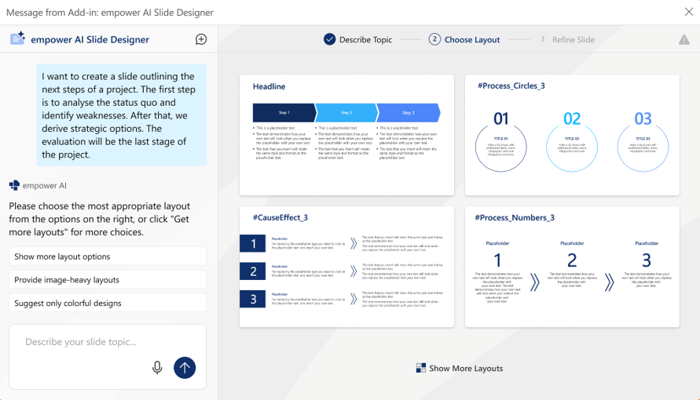
Robin: Today, AI can help with almost every part of slide and presentation creation. One example is choosing templates. In the past, a user had to decide what layout fit best and then search and open the right template from the library. With AI, you simply describe the desired content. The AI then suggests suitable layouts automatically, so you only pick from a small selection.
AI also offers big advantages in filling content and adapting it to the template structure (for example, number and arrangement of placeholders, text amounts). AI is especially helpful when modifying existing slides, like when you want to change how many elements are on a slide. In the past, that often meant choosing a new template and manually moving and adjusting content. Today, AI can do these adjustments automatically, including layout, text shortening, and rearranging.
The biggest benefit, though, is the seamless connection of all these steps: from the first idea to the finished slide, the whole process is much faster. What used to take about 30 minutes for a high‑quality slide can now be done often in just a short description and, within seconds, you get a suitable suggestion already filled with content, images, and icons. With minimal manual adjustments, the presentation is ready. Often in 3 minutes instead of 30.
The integration of all steps and the AI’s ability to respond to templates, content, and user preferences make the entire process much more efficient and pleasant.
What tasks does empower® AI intentionally not handle in the presentation process?
Robin: After a thorough evaluation of various technical approaches and prototypes, we made a deliberate decision for the initial phase not to have AI fully generate slide layouts and visual elements. Instead, empower® AI uses manually prepared or at least curated templates. There are two major reasons for this: Only this way can we ensure that corporate design and the desired design standards of our customers are always followed.
In our experience, current AI and large language models do not have a deep enough understanding of design and aesthetics. The way these models are trained and function means that fully automated layouts currently do not meet the high standards we and our customers expect for professional presentations.
Therefore, empower® AI does not do full dynamic layout generation yet. It works with approved, brand‑compliant templates.
Upcoming features will make it possible to generate full presentation storylines, not just individual slides, but well-structured presentations from beginning to end.
There are many AI tools for presentations now. How is empower® AI different?
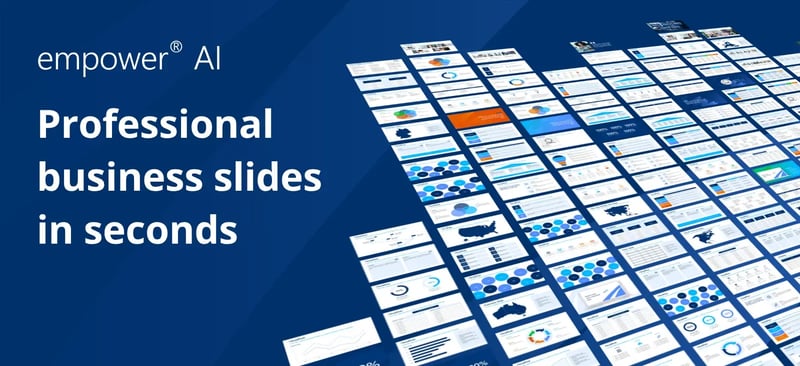
Robin: There are now many solutions on the market that use AI to create presentations or slides. Our review of these tools showed that none produced results that meet our standards. And more importantly, the standards of our customers for professional business use.
empower®AI stands out because it produces high‑quality content while reliably implementing corporate design and brand guidelines. The results from other tools were not visually or textually strong enough to be used without heavy editing.
Another difference is the focus on finalizing and comfortably refining AI‑generated slides and presentations. empower® AI places special emphasis on allowing users to easily and efficiently adjust results, beyond just text or voice input.
Finally, empower® AI also addresses key enterprise requirements for AI use. For example, large language models can be integrated that customers host and operate themselves. This approach avoids many issues companies face when adopting AI, particularly around data protection, compliance, and control of sensitive content.
How does empower® AI ensure that the created slides remain brand‑compliant and uphold corporate identity?
Robin: As mentioned, empower® AI ensures corporate identity and brand compliance by not letting the AI generate layouts and visual aspects on its own. Instead, it uses curated, manually prepared, and approved templates that are then AI‑augmented and refined. This means design standards are clearly defined and always followed.
Another important aspect is that we apply our expertise in quality‑checking mechanisms and corporate design rules within empower® AI. This allows the AI to help automate, speed up, and make more reliable some manual quality checks.
The AI is primarily used where it excels: generating text, content, and intelligently guiding the overall slide creation process.
Was there a moment in user testing that surprised you?
Robin: One of the biggest “aha” moments in the prototype phase came when I wanted to test the limits of what the system could do outside of its defined goals. I gave the AI intentionally minimal requirements, where some important aspects were only implied.
I wanted to see how far the AI could understand and handle complex tasks that required a kind of “transfer skill.” I asked it to create a slide visualizing the key results from our most recent user survey. I provided a few numbers, picked a suggestion, and then asked the AI to calculate another value that would increase the slide’s clarity, to research it online, and to explain the calculation.
Honestly, I thought this minimal and challenging set of expectations would be too much for the AI. But the result truly surprised me: the AI delivered a visually appealing slide that not only combined the numbers correctly but also brought in researched information and mathematical insight. It generated a new meaningful metric and explained it clearly. All based on my very compact instructions.
That moment impressively showed me how powerful and flexible empower® AI already is and how much potential lies in intelligently combining user input, AI, and existing tools.
What was one of the biggest challenges in developing empower® AI?
Robin: The biggest challenges were definitely learning about AI itself. This included gaining a deep understanding of how AI and large language models work, what they are capable of, and where their limits are. A central issue was handling hallucinations and incorrect responses.
It was crucial to accurately understand what AI can and cannot do. From there, we had to figure out how to connect AI meaningfully and safely with our products to optimally support user workflows. The goal was to create maximum value for users without losing human control. Users still needed to guide key outcomes.
From a technical standpoint, it was a major challenge to dive into this new area, build the right interfaces, and integrate the AI so that it helps productively without acting uncontrolled.
Thinking back to the very first idea or sketch: What did you later decide to do differently and why?
Robin: We’ve only completely dropped a few core ideas. Mostly, it has been about prioritizing and continually deciding which aspects deliver the greatest value and provide a smooth user experience. Our goal is to build a complete package that offers the biggest benefit for users and a strong business case for customers.
We still have a long list of ideas waiting. The real art is in prioritizing the right ones and keeping the user and customer value in mind, rather than trying to implement everything at once.
What is your personal favorite feature of empower® AI and why?
Robin: In a solution like empower® AI, it’s hard to name one single favorite feature. What excites me most is the fundamental change in how I personally view presentation creation. Even though I have worked in this field for many years, I always found manual slide or presentation creation tedious. It was never my favorite task.
With empower® AI, for the first time I find myself genuinely surprised at how quickly I get results. Because of this, my attitude toward making presentations has completely changed: it’s even fun now. I see how efficient and straightforward the process has become. Slide creation is no longer a bothersome, follow‑up task for me. It’s a creative, motivating part of my work.
What is your vision for the future of empower® AI within the empower® Suite?
Robin: We are still at the very beginning with empower® AI. The first feature block is complete and will soon be delivered to our customers. But our thinking goes much further: beyond slide creation, supporting entire presentations is a natural next step.
At the same time, we want to link empower® AI with other components like Copilot to, for example, access the many data sources already available in Microsoft Copilot. We also plan to integrate practical features from empower® AI into our existing solutions. We believe AI‑assisted slide creation will eventually become the central starting point for all slide work, including taking existing slides prepared and approved by internal teams.
Work on slides and presentations as it has been done in the past won’t disappear entirely. There are many opportunities to add AI support in small areas that improve functions, speed up work, simplify tasks, and overall create an even better experience for our users.
Explore more information and see a demo of empower’s AI solution here.

New branding successfully implemented at Merck

5 steps to brand-compliant Microsoft Office documents