

Five key selection criteria for enterprise AI presentation tools
1. PowerPoint integration and editability
Its output should also be fully editable. Text, shapes, icons, charts, and layouts should remain native PowerPoint objects that users can revise, reuse, and incorporate into other presentations.
2. Business-slide quality
These may include executive updates, sales decks, project reports, financial reviews, internal strategy discussions, and high-profile presentations.
Strong slides must also be visually compelling. They should make complex information understandable without sacrificing professional design quality.
3. Brand compliance
Brand compliance in PowerPoint extends beyond colors, logos, and fonts. It also includes approved templates, layout rules, image and icon styles, chart and table formatting, and other visual standards.
A company’s tone of voice is equally important. Wording, messages, and content structure should reflect the brand as consistently as the visual design. A presentation is fully brand-compliant only when the tool applies both visual and verbal standards reliably.
4. Enterprise security, governance, and model control
Companies should evaluate how a tool processes data, which permission and access controls it provides, and whether it meets existing security and compliance requirements.
They should also determine which AI models are used, where data is processed, and whether dedicated instances or controlled infrastructure options are available.
5. Cost-effectiveness
A tool that saves only a few isolated steps may still create substantial work later in the process. Companies should therefore evaluate the complete workflow, including prompt preparation, generation time, corrections, design adjustments, review, and final approval.
A tool delivers strong value when it saves meaningful time, produces reliable results, and scales across many users, presentation formats, and brand requirements.

AI presentation tools at a glance (June 2026)
The following overview evaluates several relevant AI presentation tools using the criteria above. The assessment draws on internal experience with selected solutions, publicly available vendor information, product documentation, and published pricing. It is intended as a practical market overview and decision-making guide rather than a standardized technical benchmark. The goal is to help companies understand which solutions may fit different presentation processes, PowerPoint workflows, and enterprise requirements. The review focuses on tools that work directly in PowerPoint or remain closely connected to it.
Microsoft Copilot in PowerPoint
Microsoft Copilot in PowerPoint is particularly relevant for organizations that already rely heavily on Microsoft 365 and want to introduce AI directly into existing Office workflows.
Copilot can help create, edit, summarize, and revise presentations from within Microsoft applications.
Its presentation capabilities have improved through Brand Kit support, PowerPoint templates, and newer AI models. It can now generate more varied slides than earlier versions and create full presentation drafts from prepared source material.
However, demanding business presentations still tend to require additional work.
Even with a carefully configured Brand Kit, Copilot may not apply brand standards consistently. Fonts, shapes, design elements, and layout details can deviate from approved requirements.
Generated slides may also appear repetitive or recognizably AI-produced. Processing times for full presentations and follow-up revisions may further disrupt the user’s workflow.
Strengths: Direct PowerPoint integration, useful support for rapid first drafts, summaries and revisions, Brand Kit capabilities, and template support.
Limitations: Copilot is not specifically designed to create highly polished, fully brand-compliant business slides. Output quality depends heavily on the underlying setup, and larger presentations commonly require additional editing. Generation times for complete presentations can also be significant.
Pricing: Microsoft lists Microsoft 365 Copilot for Enterprise plans at $30 per user per month with annual billing. Different add-on structures may apply to Business plans.* Source: https://www.microsoft.com/en-us/microsoft-365-copilot/pricing/enterprise
Companies should also consider how computing requirements, usage allowances, and evolving pricing models may affect long-term value.
Many AI providers are moving from flat-rate subscriptions toward usage-based pricing. This may increase costs for resource-intensive tasks such as generating complete presentations.
Best suited for: Organizations that want to embed AI broadly across Microsoft 365 and primarily use Copilot in PowerPoint for summaries, basic presentation drafts, and initial content development.
empower® AI
empower® AI is designed specifically for creating professional business slides directly in PowerPoint.
It is particularly relevant for organizations that need more than fast slide generation. The solution focuses on editable, secure, and fully brand-compliant presentations within established PowerPoint workflows.
empower® AI can use company templates, approved design elements, icons, images, and centrally managed content. This allows it to create presentations that appear less generic and align more closely with the organization’s brand system. Layout, positioning, and formatting are applied within the approved brand framework while the user works with the AI. The result is intended to be a completed business slide rather than a rough draft requiring extensive cleanup.
Depending on the use case, the solution may reduce slide-production time by approximately 50 percent compared with a fully manual process.
empower® AI follows a human-in-the-loop model. The user defines the content, direction, and preferred visualization, while the AI assists with implementation, layout, design, and formatting. The user remains in control throughout the process.
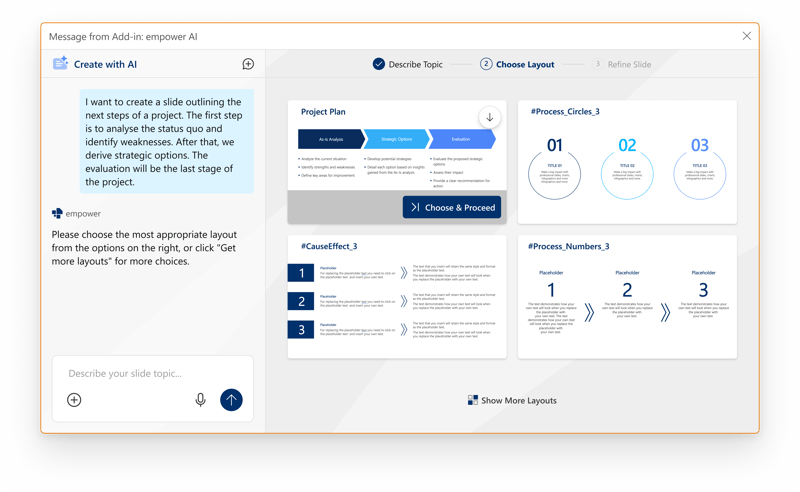 The company also plans to support freer slide creation outside existing templates, allowing users to produce more complex visualizations while still working within a controlled environment.
Organizations may deploy the solution through options such as their own Azure OpenAI instance, providing greater control over models, infrastructure, and data processing.
Strengths: Direct PowerPoint integration, professional business-slide output, centralized templates and assets, comprehensive brand compliance, a human-in-the-loop workflow, enterprise security, and control over models and infrastructure.
Limitations: Less suitable for unrestricted experimental design outside company brand standards. It may also be less relevant for freelancers or individual users who prioritize maximum creative freedom.
Pricing: Pricing is calculated individually according to the number of licenses and the required product configuration. empower® AI may be licensed as a stand-alone AI feature set or as part of empower® Slide Generation. Source: https://www.empowersuite.com/de/preise
Best suited for: Organizations with demanding requirements for slide quality, brand compliance, security, governance, and controlled PowerPoint-based workflows.
Claude for PowerPoint
Claude for PowerPoint brings Claude’s AI capabilities into PowerPoint through an add-in.
It is particularly useful for teams that want to condense complex information, improve narrative structure, and create strong initial business-slide drafts. Users can create, edit, and expand slides directly within an existing presentation.
Claude generally produces well-structured drafts and presents complex content clearly, making it a useful starting point for further refinement. However, several limitations remain for enterprise production workflows. Generating an average presentation of 10 to 15 slides may take 20 minutes or longer. Depending on the user’s role and responsibilities, this may interrupt normal work.
Brand compliance is also inconsistent. Although Claude can use the existing presentation and slide master as a reference, it may not consistently follow approved font sizes, colors, accent colors, or layout boundaries.
Because the provider is based in the United States and data may be processed outside Europe, companies should evaluate security, governance, data residency, and privacy requirements before implementation.
Strengths: Direct PowerPoint integration, editable slides, strong writing and content-structure capabilities, effective handling of complex information, and high-quality first drafts.
Limitations: Generation and revision times can be lengthy. Brand and layout requirements are not always applied consistently, and organizations should evaluate security, governance, data processing, and resource consumption based on their own requirements.
Pricing: Claude offers Team and Enterprise plans. According to the provider, Team plans begin at $20 per seat per month with annual billing. Enterprise pricing is customized or usage-based. Source: https://claude.com/pricing*
Companies should also evaluate token usage and processing costs because presentation generation can be computationally intensive.
Best suited for: Teams that need to structure complex information, sharpen arguments, improve language, and create high-quality initial PowerPoint drafts.
ChatGPT for PowerPoint
ChatGPT for PowerPoint brings the familiar ChatGPT interface directly into PowerPoint through an add-in. It supports presentation creation, revision, and optimization and may be particularly relevant for organizations that already use ChatGPT.
Users can save custom instructions that ChatGPT will consider in future PowerPoint conversations. These instructions may cover recurring requirements such as header design, colors, layout preferences, and formatting rules. The solution can also recognize elements from the existing presentation, including the slide master, logos, and brand colors.
However, these requirements are not always applied consistently. The tool may introduce design elements that are not part of the approved template or use an incorrect font. Additional instructions can improve the output, but manual editing may still be required to bring the presentation fully into line with company brand standards.
The initial drafts show potential and may provide a useful foundation for further work. Depending on the task, generation may take several minutes per slide and considerably longer for complete presentations. The familiar ChatGPT interface is a clear advantage because many users already understand how to work with it.
Strengths: PowerPoint-native use, familiar ChatGPT interface, intuitive conversational workflow, promising initial business-slide drafts, and support for reusable custom instructions.
Limitations: Custom instructions and brand requirements are not always applied reliably. Fonts, template elements, and AI-generated design choices may require correction. Processing times may also be lengthy for individual slides and full presentations.
Pricing: Availability depends on the customer’s ChatGPT plan. According to OpenAI, use remains free for Business and Enterprise customers until August 6, 2026. A token-based or credit-based model is expected to apply afterward.* Source: https://help.openai.com/en/articles/11481834-chatgpt-rate-card-business-enterpriseedu
Best suited for: Organizations that already use ChatGPT and want to test a familiar, conversational, PowerPoint-native tool for creating early business-slide drafts.
Beautiful.ai
Beautiful.ai is built around its own presentation platform but also provides a PowerPoint add-in.
Its primary focus is automated presentation design. The Smart Slide system automatically adjusts layouts and helps users create visually consistent presentations without manually formatting every element.
Organizations can also configure brand elements. This can be especially useful for teams without dedicated presentation-design resources.
However, companies with deeply established PowerPoint processes, complex templates, or strict brand-governance requirements should carefully test exporting, editing, and integration.
Strengths: Automated layouts, visually consistent designs, and straightforward creation of professional-looking presentations.
Limitations: Beautiful.ai relies primarily on its own platform workflow rather than a fully PowerPoint-native process. Its suitability for complex brand, template, security, and governance requirements should be evaluated carefully.
Pricing: Beautiful.ai lists Pro plans starting at $12 per month with annual billing, Team plans starting at $40 per user per month with annual billing, and custom Enterprise pricing.* Source: https://www.beautiful.ai/pricing/
Best suited for: Teams that want to create visually consistent presentations quickly and benefit from automated layout support.
* Pricing may vary by region, billing model, and current plan availability.
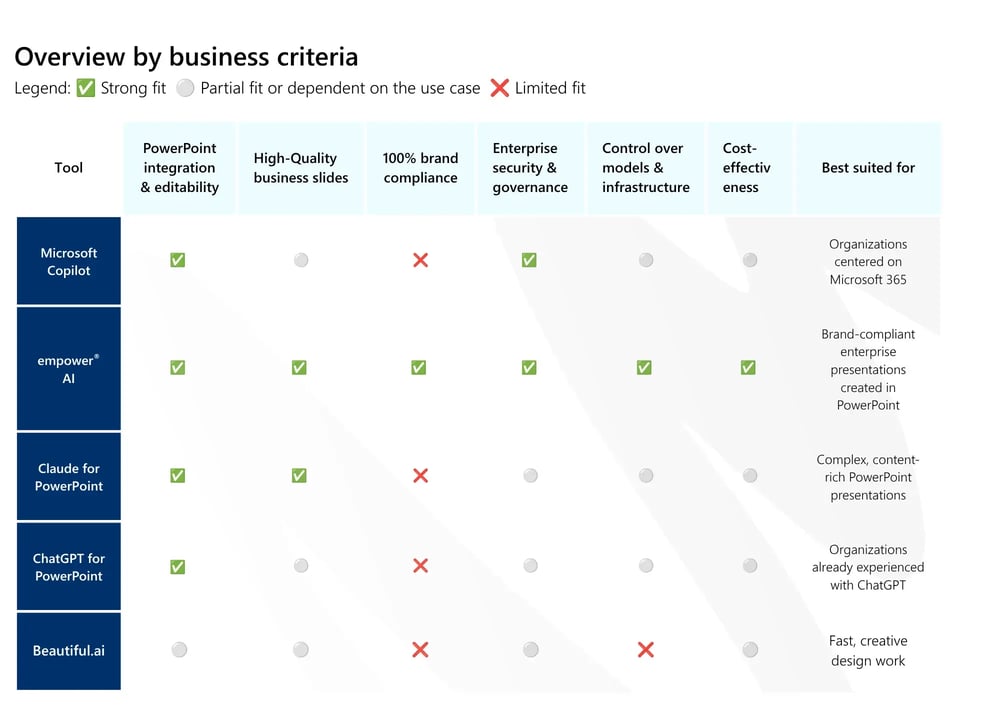
Recommendations by enterprise use case
Fast, Creative Presentation Design
Beautiful.ai and similar solutions outside the traditional PowerPoint environment may be the strongest options when speed and creativity are the main priorities. Examples include Prezi AI, Gamma, Canva AI, and Visme.
These tools are well suited to early concepts, modern visualizations, web-based decks, marketing materials, and dynamic presentation formats.
Brand-compliant business slides
empower® AI is particularly relevant when companies need professional, brand-compliant slides created directly in PowerPoint. It allows organizations to work with centralized templates, approved assets, design elements, and established brand rules. This is especially valuable for executive presentations, sales decks, project updates, strategy documents, and external corporate communications. The emphasis is on controlled production of professional business slides within the approved brand system.
AI within Microsoft 365 and PowerPoint workflows
empower® AI, Microsoft Copilot, Claude for PowerPoint, and ChatGPT for PowerPoint are all relevant options. Microsoft Copilot is a natural choice when AI is intended for broad adoption across Microsoft 365. Claude for PowerPoint and ChatGPT for PowerPoint may be attractive when companies want advanced language-model capabilities directly within the PowerPoint process. Both should be reviewed by IT teams for security, governance, privacy, and data-processing requirements before broader deployment.
Content, structure, and argumentation
Claude for PowerPoint, empower® AI, ChatGPT for PowerPoint, and Microsoft Copilot in PowerPoint are particularly relevant when the quality of the content and narrative is the main priority. Claude performs well when condensing information, developing arguments, and improving language. ChatGPT for PowerPoint may become increasingly relevant for organizations that want to use the familiar ChatGPT experience inside PowerPoint. Microsoft Copilot can be useful when content from the broader Microsoft 365 environment needs to be incorporated into a presentation.
Conclusion: What matters most when choosing a tool
The AI presentation market is more diverse and dynamic than ever. However, the available tools are designed for different purposes. Some prioritize rapid drafts and creative exploration. Others focus on content development, writing, or visual design.
Enterprise requirements are often more demanding. As presentations become more closely connected to professional business processes, editability, collaboration, brand compliance, security, governance, and workflow integration become increasingly important. The most important question is not which tool creates the most attractive demonstration slides. It is which tool can become a reliable and sustainable part of the organization’s presentation process.
Companies planning to use AI for presentations over the long term should look beyond isolated examples. They should evaluate how well each solution supports the complete process from the first idea to the final approved presentation. This is where the distinction between creative presentation generators and specialized enterprise solutions becomes most visible.
Frequently asked questions
1. What is an AI presentation tool?
An AI presentation tool supports the creation, revision, or optimization of presentations. Depending on the solution, it may organize content, generate slides, recommend designs, summarize presentations, or improve existing material.
2. Which AI presentation tool is best for businesses?
The right tool depends on the company’s requirements. Enterprise users should prioritize PowerPoint compatibility, editability, brand compliance, security, governance, and integration with existing workflows. Depending on the use case, relevant solutions may include empower® AI, Microsoft Copilot, Claude for PowerPoint, Visme, Canva AI, and other tools.
3. Which AI Tools Can Create PowerPoint Presentations?
Several AI tools support PowerPoint directly or indirectly. empower® AI, Microsoft Copilot, Claude for PowerPoint, and ChatGPT for PowerPoint work directly in PowerPoint or remain closely connected to the PowerPoint workflow. Gamma, Canva AI, Beautiful.ai, Visme, and Prezi AI can also create presentations, but they are not primarily PowerPoint-native enterprise solutions.
4. Can AI create fully brand-compliant presentations?
Yes, provided the tool has access to approved templates, brand rules, and design assets. Basic Brand Kits may support logos, colors, and fonts.
Comprehensive enterprise brand compliance usually requires deeper integration with templates, layouts, assets, content libraries, and governance processes.
5. How does an AI presentation generator differ from PowerPoint AI?
An AI presentation generator usually creates slides within its own web-based platform. PowerPoint AI works directly in PowerPoint or remains closely connected to the PowerPoint process. This difference matters in enterprise environments because presentations typically need to be edited, reviewed, approved, and finalized in PowerPoint.
6. Is ChatGPT for PowerPoint already a complete enterprise solution?
ChatGPT for PowerPoint is a notable new development, but it is still in beta (June 2026). Organizations may benefit from testing and monitoring the solution. However, they should evaluate it carefully before using it in critical enterprise presentation workflows.
7. Which criteria matter most when evaluating enterprise AI presentation tools?
The most important criteria include PowerPoint integration, editability, business-slide quality, brand compliance, security, governance, model and infrastructure control, and overall value.
8. Which AI presentation tool is best suited to enterprise requirements?
Enterprise tools should support PowerPoint integration, brand compliance, security, governance, and scalability. empower® AI is specifically designed for these requirements, while Microsoft Copilot is particularly relevant for organizations centered on the Microsoft 365 ecosystem.
AI in PowerPoint: The real effort and how to use it intelligently

Brand integrity in Microsoft 365: Strong brands start in employees' everyday lives