


Charts, even complex ones, can technically be created using native PowerPoint tools. In practice, however, this is time-consuming, error-prone, and hardly scalable. For years, companies have therefore relied on professional chart creation add-ins for PowerPoint.
These provide specialized chart logics, automation, and visualization mechanisms that would otherwise require significant manual effort using native PowerPoint features. Today, these chart creation add-ins are being reassessed – not because of their technical quality, but due to costs, licensing models, and operational overhead.
This article explains:- why companies are reassessing their chart creation add-ins,
- which technical and organizational challenges arise in day-to-day work,
- why switching is emotionally and operationally demanding,
- and which requirements a modern chart creation add-in must meet to be productive, economically viable, and realistically deployable.
Based on real enterprise transition projects with empower®, we illustrate how companies can continue using existing charts, bring experienced users along, and simultaneously reduce costs, complexity, and transition risks.
How are chart add-ins for PowerPoint used in companies?
Chart creation add-ins for PowerPoint have long been an integral part of presentation work in many organizations. They enable the efficient creation of complex charts – such as waterfall, Gantt, Mekko, column, or bar charts – based on Excel data or via direct Excel links.
From a functional perspective, these solutions are established and powerful. They address precisely the point where native PowerPoint tools reach their limits in everyday business: high time investment, manual work, and increasing susceptibility to errors.
Currently, however, chart creation add-ins are under renewed scrutiny for another reason: cost and consolidation pressure. Companies are reviewing ongoing licensing costs as well as the administrative burden associated with license management, vendor management, annual usage audits, and the resulting internal discussions.
This raises a central question: How can existing chart creation add-ins be replaced or restructured in a way that reduces costs and complexity – without productivity losses or operational risk?

Why companies are reassessing their chart creation add-ins
The technical performance of existing chart creation add-ins is rarely questioned. For specialized users, the solutions available on the market typically work very well. The reassessment is triggered by other factors:
- ongoing cost and consolidation pressure
- high annual licensing and operational overhead
- time-consuming yearly license reviews, including recurring internal discussions when licenses are withdrawn or reassigned
- professional chart functionality available only to part of the organization
- growing number of separate PowerPoint add-ins within the company
In short: the chart creation add-ins work well – but their licensing and operational models increasingly clash with the organizational reality of large enterprises.
What does daily business look like with PowerPoint?
In large organizations, several hundred or even several thousand employees may work with such an add-in. At the same time, significantly more people use presentations containing charts created with it. Typical scenarios:
- Charts are created by users with the chart creation add-in.
- These charts are passed on internally to users without the add-in.
- Those users edit the charts using native PowerPoint tools.
As long as charts remain unchanged, this setup often goes unnoticed. It becomes problematic as soon as charts need to be adjusted, updated, or further developed – which regularly happens in corporate environments.
What happens to complex charts without the original add-in?
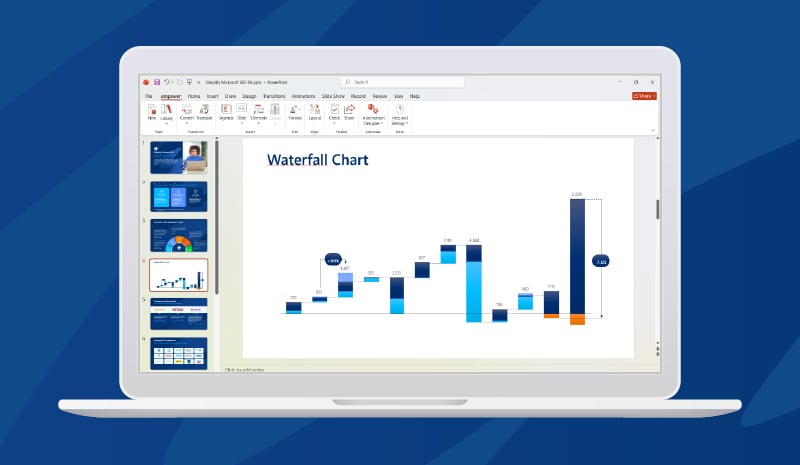
Complex charts contain logics that cannot be fully reproduced using native PowerPoint tools, such as:
- arrows, breaks, and connection elements
- multi-level waterfalls or Mekko charts with multiple data series
- combined calculation and visualization elements
- Gantt charts
When such charts are modified without the originally used chart creation add-in, the following occurs:
- chart logic is lost due to manual adjustments of individual elements
- the chart is no longer technically recognizable by the original add-in
- repair or clean reversion is no longer possible
The consequence is clear: The chart must be rebuilt from scratch.
Why this is problematic for everyone involved
For users with the chart creation add-in, this means:
- loss of time
- unnecessary rework
- frustration over lost work
For PowerPoint users without the add-in, it means:
- time-consuming adjustments
- limited editability
- lack of transparency regarding the original chart logic
This is not individual user error. It is a structural media break that becomes more frequent as organizations grow and is difficult to prevent organizationally.
Why switching charting software is emotionally sensitive
Switching an established chart creation add-in is not purely a technical project.
Many experienced users:
- have worked with the same solution for ten or more years
- have built deep expertise
- are considered internal experts
A transition is therefore often perceived as:
- loss of routine
- threat to personal efficiency
- a purely cost-driven decision
If a switch is not implemented cleanly – technically and organizationally – resistance arises. And this is exactly what decision-makers in companies are legitimately concerned about.
What requirements should a modern chart add-in meet during a transition?
Against this backdrop, one thing becomes clear: A transition requires both a powerful technical solution and a provider capable of supporting the organizational and human side of change.
1. Requirements for the chart creation add-in
The chart creation add-in itself must:
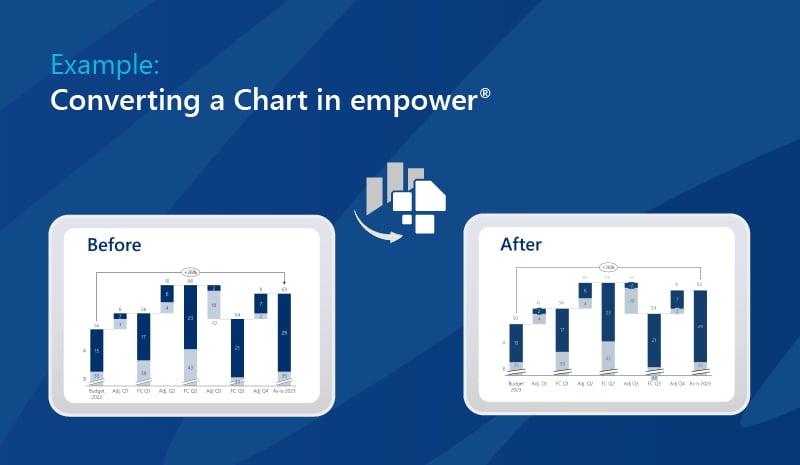
- be able to convert existing charts to avoid rebuilding
- consistently reproduce complex chart logics
- be deployable across the entire organization to prevent media breaks
- support all chart types relevant to day-to-day business
Overview: Chart types supported by empower®
empower® supports all chart types relevant in everyday business, including:
- single- and multi-level waterfall charts
- bar and column charts (simple, grouped, stacked)
- line, area, and mixed charts
- Gantt charts
- Mekko and Marimekko charts
- pie, donut, and butterfly charts
- scatter, bubble, and radar charts
In total, the software supports more than 40 chart types – including smart additional elements such as arrows, lines, breaks, and custom number formats.
2. Requirements for the provider
The provider must:
- enable an enterprise-wide licensing model without annual case-by-case reviews
- measurably reduce licensing and administrative overhead
- support experienced users in a structured and continuous manner
Only the combination of product capability and change expertise makes a transition realistic and sustainable.
Why companies expect more than charting features
In many transition projects, another effect becomes visible: Replacing a chart creation add-in is used as an opportunity to improve overall presentation productivity.
Charts are rarely isolated. They are part of presentations – and this is where additional productivity pressure arises:
- layout and consistency
- manual corrections
- recurring alignment and revision cycles
empower® deliberately addresses these needs far beyond chart functionality:
- one-click conversion of existing charts
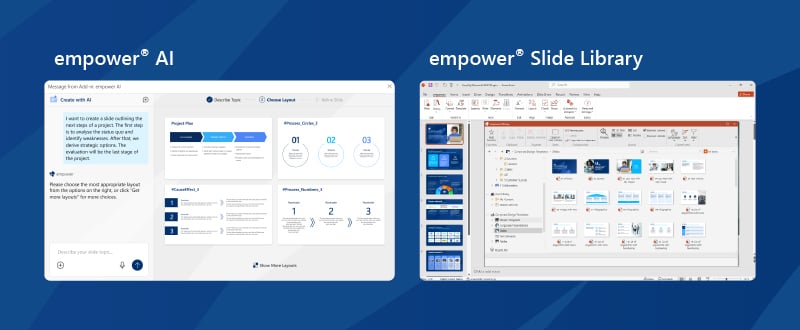
- AI-supported creation of slides and presentations
- integrated library for templates, content, and design assets
- automated consistency checks and error corrections
- productivity tools that eliminate manual formatting work
For users, this means:
- less routine work
- 100% focus on content
For companies, this often results in six- to seven-figure savings.
Experience from real enterprise transitions
Such transitions have already been implemented with empower® in numerous large enterprises, including Bayer, Evonik, Continental, DHL Post & Parcel, and BROSE. Common characteristics of these projects:
- conversion of existing charts instead of rebuilding
- intensive support for experienced users
- phased rollout
- enterprise-wide licensing model
As a result, the transition was not perceived merely as a cost-saving measure, but as a structural efficiency gain.
The economic impact of charting software
In practice, companies frequently reduce licensing, operational, and administrative costs by six- to seven-figure amounts – depending on company size and the existing add-in landscape. Not by giving up functionality. But through simplification, consolidation, and structured organization.
Conclusion
The question of whether chart creation add-ins are valuable for large enterprises has long been answered. Professional chart functionality has become indispensable in corporate environments.
Today, the decisive question is different:
How can companies enable all employees to work productively with charts – without media breaks and without excessive costs?
This is where functional software and sustainable solutions diverge. It is not a single feature that matters most, but the ability to provide chart functionality enterprise-wide – organizationally clean, economically sound, and frictionless in daily operations.
More and more corporations are therefore making decisions not primarily based on individual features, but on overall impact: productivity for everyone, reduced complexity, and a licensing model built on solid foundations.
That is exactly what empower® delivers – and has successfully implemented in enterprise organizations for nearly 10 years.
FAQ on Chart Add-ins for PowerPoint
Why are companies reevaluating their chart add-ins right now?
Typically, it is not due to technical limitations, but rather rising costs, complex licensing models, and the ongoing administrative burden.
Why are PowerPoint’s built-in tools often not enough for complex charts?
Although complex charts can be created in PowerPoint, doing so usually requires significant manual effort, increases the risk of errors, and does not scale well.
What happens when complex charts are edited without the original add-in?
Important chart logic is often lost, which means the charts frequently have to be rebuilt from scratch.
Why can switching chart add-ins be challenging?
Many experienced users have relied on the same solution for years. As a result, switching tools is often seen as a loss of familiarity, efficiency, and confidence.
What should a modern chart add-in provide during a transition?
It should convert existing charts, support all key chart types, and work across the entire organization to prevent workflow disruptions and productivity loss.
How does empower® support companies during this transition?
empower® provides more than charting functionality. It also offers conversion capabilities, an enterprise-wide licensing model, and proven experience from successful enterprise transition projects.
What is the financial impact of a modern chart add-in?
Companies often achieve significant reductions in licensing, operational, and administrative costs. Depending on the starting point, this can lead to savings in the six- to seven-figure range.
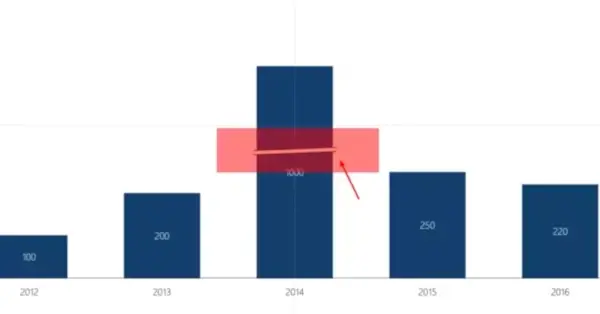
Create clear charts with breaks in PowerPoint in 4 steps

Modern PowerPoint charting – Why businesses choose empower® Chart Creation