

Creating professional charts and reports is essential for professionals in consulting, finance, and corporate planning. But PowerPoint’s built-in tools often fall short. That’s where empower® Chart Creation comes in – a modern charting solution built to meet today’s business needs.
This article outlines what companies should expect from charting software, what to consider when choosing one, and why empower® Chart Creation has become the preferred solution for many organizations.
What is modern charting software for PowerPoint?
Modern charting software for PowerPoint is a specialized solution designed for organizations that frequently produce complex charts and reports. It streamlines the creation of standard business charts, making them faster to build, easier to maintain, and more consistent than using PowerPoint’s native tools. It is especially valuable in reporting, finance, controlling, and strategy workflows where charts are used repeatedly.
When charting software makes sense and when PowerPoint is enough
How does empower® support chart creation in PowerPoint?
empower® Chart Creation is a powerful PowerPoint add-in that enables fast, consistent, and efficient chart and report creation, right within PowerPoint.
Compared to PowerPoint’s standard features, empower® can save users up to 50% of their time. It offers all essential business chart types in a structured layout, helping users create and refine visuals clearly and consistently.
When evaluating a charting tool, companies often ask:
- Is the licensing model transparent and scalable?
-
Is it fully compatible with Microsoft 365?
- Is it easy to use?
-
Is support and training available?
- What happens to existing charts during migration?
Here’s how empower® addresses each of these questions.
What types of charts does empower® support?
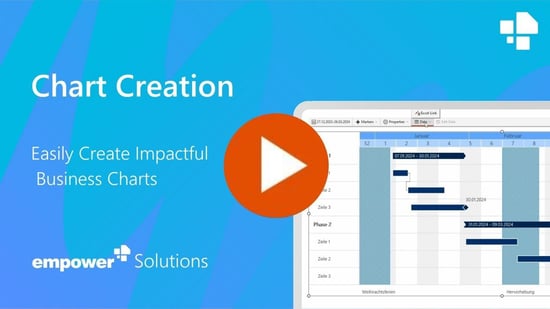
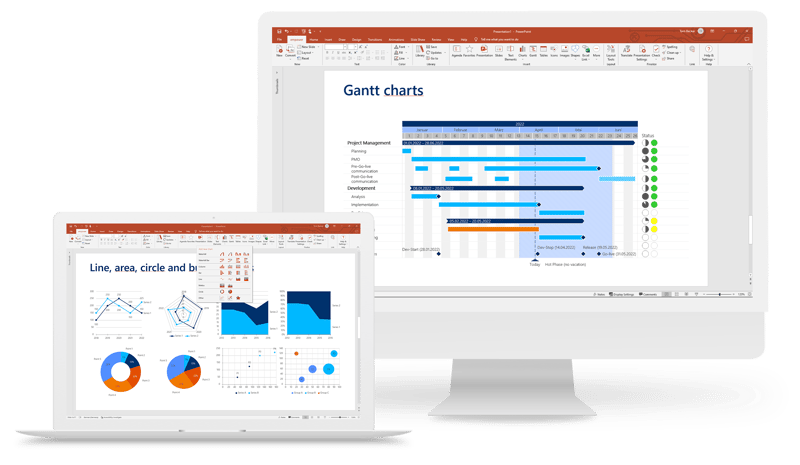
Clear, accurate visuals are critical for sound business decisions. What types of charts can be created using empower® Chart Creation? empower® supports a wide range of chart types, including:
-
Waterfall charts for financial analysis
- Gantt charts for project timelines
-
Stacked and grouped bar and column charts
- Line, area, pie, scatter, and network charts
With built-in features like totals, percentages, connectors, and status markers, empower® helps deliver clear, effective messages.
Smart Excel integration and automatic updates ensure that linked charts, text, and shapes stay current. Charts auto-format in placeholders, eliminating the need for manual adjustments. Spacing, fonts, and proportions remain consistent.
empower® also excels at managing Gantt charts, allowing users to hide phases, add milestones and holidays, and apply updates centrally.
The result: consistent, professional visuals that support faster decisions.
What companies should look for in charting software
For IT and procurement leaders, predictable costs are essential. empower® uses a licensing model built around transparency and ease of management:
-
License keys do not expire annually.
- Unused licenses return to a shared pool for reassignment.
-
Additional licenses can be added mid-year without back charges.
- A company-wide license minimizes admin work.
This setup reduces administrative overhead while enabling company-wide productivity.
Why empower® is more than just charting
empower® Chart Creation is part of the empower® Suite, which helps teams create professional documents and presentations in Microsoft 365. It combines templates, charting tools, content management, automation, and AI in one unified platform.
empower® Slide Generation, Chart Creation, and Template Management work together seamlessly. Data is turned into charts in seconds. Presentations are built faster and always follow brand guidelines. Updated templates and content are available directly in PowerPoint, Word, Excel, and Outlook.
This creates a streamlined Microsoft Office environment that replaces scattered tools, reduces IT workload, and simplifies everyday tasks.
The importance of Microsoft 365 compatibility in charting software
empower is a certified Microsoft partner and part of the Microsoft Compatibility Lab. That means new Microsoft 365 updates are tested with empower® in advance. This ensures:
-
Full compatibility with Microsoft 365
- Timely updates to match new Microsoft releases
-
Ongoing collaboration with Microsoft’s development team

How does testing with empower® work?
empower® Chart Creation can be tested free of charge in a structured, low-risk trial. Participants receive support from empower experts who guide them through real-world use cases and help ensure a smooth evaluation – especially for users transitioning from other tools.
Users create typical charts from their daily work. The outcome is clear and data-driven, showing exactly how the tool performs in practice.
What happens with existing charts?
A common concern when switching tools is what happens to existing charts. empower® Chart Creation offers a built-in conversion feature. Existing charts, created in other tools, can be imported with a few clicks.
You can convert charts individually or in batches and automatically apply your corporate design. Even Excel links are retained. The result is a smooth, uninterrupted transition.
Conclusion – A future-ready charting tool
Businesses aiming to elevate their charting process need more than another PowerPoint add-in. They need a scalable, intuitive solution that’s fully compatible with Microsoft 365 and easy to adopt.
empower® Chart Creation delivers exactly that. It’s already trusted by companies like Bayer, DHL, and Continental – and may be just what your team needs.
Interested in a demo or have questions about implementation? Contact us today – we’re here to help.
FAQ
What is charting software for PowerPoint?
Charting software for PowerPoint is built for organizations that regularly work with complex charts and reports. empower® Chart Creation enables users to create these charts directly in PowerPoint in a faster, more structured, and more efficient way.
When do PowerPoint’s standard chart features fall short?
PowerPoint’s built-in tools become limiting when complex chart types, Excel integrations, recurring reporting, and strict design requirements are combined. In these cases, specialized charting software significantly reduces manual effort.
Which chart types should modern charting software support?
A modern solution should cover all key business chart types, including Gantt, waterfall, bar, column, and line charts, with a strong focus on ease of creation and updating.
What happens to existing charts when new software is introduced?
Most modern solutions allow existing charts to be reused or converted. empower® Chart Creation supports this process with a dedicated conversion feature to ensure a smooth transition.
What should companies look for when choosing charting software?
Key factors include ease of use, Microsoft 365 compatibility, support for relevant chart types, transparent licensing, and strong onboarding and support services.
How does empower® Chart Creation support organizations?
empower® Chart Creation helps organizations produce professional, consistent charts in PowerPoint quickly and efficiently. It also provides tools for chart conversion, Excel integration, onboarding, and ongoing support.

Creating mixed charts in PowerPoint

How to create a waterfall chart? A step by step guide