

PowerPoint is widely used, yet often applied inefficiently and without consistent brand alignment. While AI can save time when it comes to structure and text, it cannot replace strategic thinking. The greatest impact comes from clear standards and the smart interaction between people, AI, and specialized tools.
PowerPoint in everyday business: widely used, but with efficiency and quality gaps
PowerPoint is an integral part of everyday work in US companies. According to the 2025 Office Study conducted by Kantar, which surveyed around 1,000 office employees in the United States, 93% regularly use Microsoft Office applications, and 71% specifically use PowerPoint.
Whether in sales, marketing, or management, presentations are part of daily work in almost every department. Few tools are as deeply embedded in professional workflows as PowerPoint.
However, widespread use does not automatically mean high quality or efficiency. Presentations are far more than simple carriers of information. They act as brand ambassadors, decision-making tools, and strategic communication assets. This makes it all the more problematic that in many organizations they are created inefficiently, designed inconsistently, and not consistently aligned with corporate branding.
Using data from recent studies, this article highlights typical efficiency, design, and branding challenges in PowerPoint, shows how AI can provide support, and explains how solutions like empower® Slide Generation contribute to faster and more consistent presentation creation.
The biggest challenges according to the Microsoft Office Study
- High time investment due to manual routines
Office applications such as documents, spreadsheets, presentations, and emails account for 67% of weekly working time. Employees spend an average of 6.5 hours per week on PowerPoint alone. Many of these tasks are repetitive, manual, and barely standardized.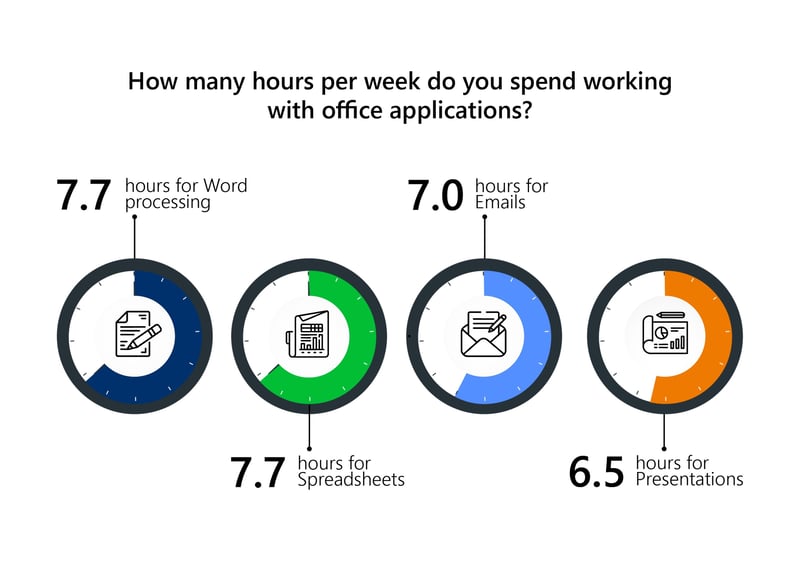 Little reuse, lots of copy and paste
84% of respondents regularly create very similar presentations with only minor adjustments. Instead of efficient reuse or automation, copy and paste processes dominate costing time and increasing the risk of errors.
-
Lack of design know-how
73% find creating charts cumbersome, and also 73% struggle with visual design. PowerPoint is rarely learned systematically, and design expertise is often lacking, leading to frustration and inconsistent results. -
Time-consuming implementation of corporate design guidelines
Although most employees are familiar with brand guidelines, more than 58% find applying them in everyday presentation work time-consuming and complex. A clear gap exists between guidelines and actual practice.
How can AI support presentation creation?
Artificial intelligence has long arrived in everyday office work and it doesn’t stop at PowerPoint. According to the study, 77% of respondents already use AI tools such as ChatGPT, Microsoft Copilot, or similar applications. This opens up new opportunities in presentation creation to speed up processes and develop content more efficiently.
AI is particularly helpful when it comes to structuring topics, formulating text, and developing initial lines of argument. With a clear briefing, outlines, bullet points, or draft texts can be created in a short amount of time. AI-powered tools can also assist visually by suggesting simple layouts, charts, or initial design ideas. In addition, presentation coaching tools analyze language, pace, and delivery, providing feedback on impact and effectiveness.
However, when it comes to creating professional, brand-compliant business presentations, many AI tools quickly reach their limits.

Complexity and context: where AI falls short
-
Lack of strategic understanding
AI often recognizes connections only on a surface level and does not always prioritize content in line with the target audience or presentation goals. -
Limited creative and emotional depth
Compelling stories, dramaturgical structure, and emotional appeal cannot be automated and require human experience. -
Restricted branding and design expertise
AI-generated layouts may provide a starting point, but they usually require refinement to fully comply with corporate design standards and professional expectations. -
The presentation moment remains human
Personality, body language, spontaneity, and situational responsiveness cannot be replaced by AI.
The greatest value is created through the collaboration between humans and machines. People provide context, objectives, brand understanding, and tone while AI handles preparation, acceleration, and operational support.
Searching for content costs time and motivation
More than 60% of employees spend at least 30 minutes per month searching for existing slides, presentations, and documents. In larger organizations, this adds up to thousands of lost workdays per year and ties up valuable resources.
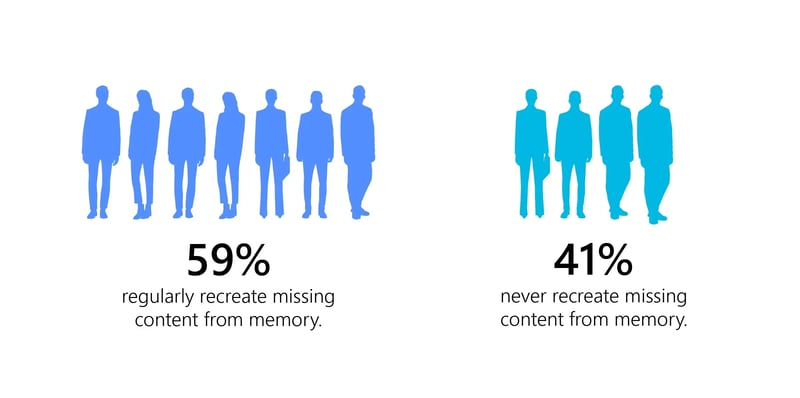
When content cannot be found, it is recreated. 59% of respondents say they regularly rebuild presentations from memory often using outdated information, incorrect figures, or inconsistent design. This not only increases the time required but also raises the risk of errors.
While existing slides are frequently reused, every second person has already unintentionally used outdated content. What appears efficient at first glance can quickly turn into a communication and reputational risk.
The growing use of online versions such as PowerPoint Web further amplifies this issue. While they enable collaborative work, they reach functional limits when it comes to complex formatting and strict design requirements.
How empower® Slide Generation simplifies presentation creation
The PowerPoint add-in empower® Slide Generation combines AI, automation, branding, and content management in one environment, enabling slides to be created quickly, consistently, and efficiently. Integrated empower® AI processes text and voice input as well as content from files or websites and converts them into brand-compliant slides. Templates, design rules, and content are directly available in PowerPoint, while productivity features simplify formatting and keep content up to date. The result: professional presentations in significantly less time.
Conclusion
The Microsoft Office Study clearly shows that presentation creation holds enormous optimization potential. Organizations that structure processes, centralize templates, make content easy to find, and use AI wisely save time and significantly improve quality.
AI is a powerful accelerator. But it does not replace strategic thinking, brand understanding, or personality. The key lies in clear standards, the right tools, and a deliberate interplay between people and technology.
Presentations that are created efficiently, designed consistently, and communicate convincingly build trust, impact, and lasting relevance.


Data visualization software - put an end to hours of visualization

Presenting in line with corporate design is what truly matters